Printing is finally solved. Your cloud software and AI agents can now talk to your local hardware.
ProxyBox Zero turns every local device — printers, scales, whether connected via USB or network — into a secure HTTPS API endpoint. Access them from your local network, or from anywhere on the internet through an encrypted tunnel.
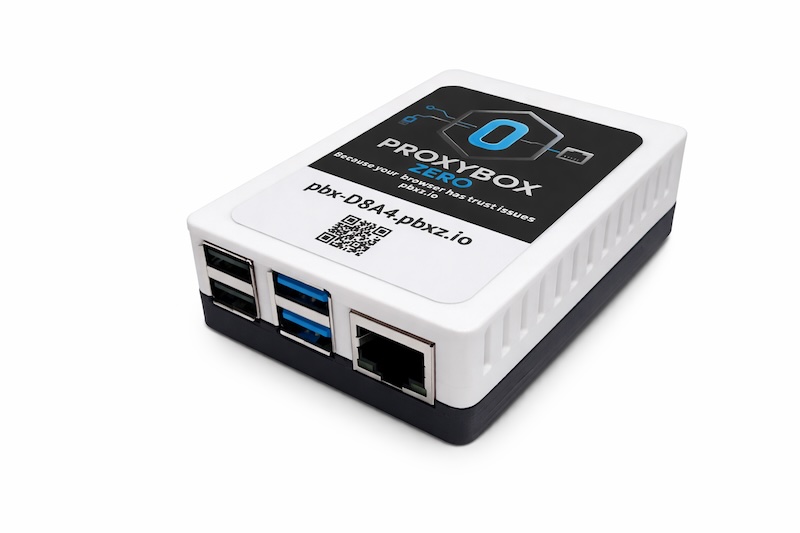
pbx-D8A4.pbxz.iopbx-D8A4.pbxz.cloudPrint to any local printer from anywhere — with a single HTTPS POST.
Every printer on your network becomes a secure REST endpoint. Your cloud ERP, your SaaS app, a scheduled job, or a one-line curl can dispatch a print in a single HTTPS request. No drivers, no plugins, no middleware.
# Print a 4x6 shipping label to the dock Zebra via tag
POST https://pbx-D8A4.pbxz.cloud/api/v1/print/tag_UPSLABELS

# Print to a specific networked Zebra ZD421
POST https://pbx-D8A4.pbxz.cloud/api/v1/print/tcp_10-0-12-88_9100

# Print to a USB-connected Dymo label printer
POST https://pbx-D8A4.pbxz.cloud/api/v1/print/usb_sn_DYM0514872
zpl_labels_3x1Carbon brings ProxyBox to its platform as the Carbon Bond
Carbon is the open-source manufacturing ERP — an API-first platform unifying ERP, MES, and QMS for discrete manufacturers. Carbon supports printing on its platform with the Carbon Bond — its own edition of ProxyBox — so any Carbon instance can drive every printer on your shop floor directly.
 Carbon Bond · by ProxyBox
From work order to printed label — without leaving Carbon.
Carbon runs in the cloud and is API-first. Your printers live on the shop floor. The Carbon Bond — a white-labeled ProxyBox — bridges the two with a single secure HTTPS call, so part, lot, and shipping labels print straight to the printers on the line. No desktop print agents, no per-workstation drivers, and immune to the browser Local Network Access blocks that break browser-to-printer printing.
Part & traceability labels
Lot, serial, and work-order labels with full material traceability — straight from Carbon.
Any shop-floor printer
Zebra, USB, network, IPP — the Carbon Bond drives whatever is already on the line.
Secure, no LNA prompts
Routed over a public .cloud URL. No port forwarding, no browser permission dialogs.
API-first, like Carbon
One REST POST per print. No SDK, no middleware, nothing extra to maintain.
Your hardware. Your network. Your data.
ProxyBox is built for environments where software needs to talk to local devices securely. Your printers, scales, and gear live on your LAN and keep working when the internet doesn't — nothing depends on our cloud to function. When you need remote access, just swap the .io for .cloud and reach the same device through an end-to-end encrypted tunnel your data passes straight through, with nothing stored in transit on our servers or anywhere else. The API, the request, the response — everything else works exactly the same as the .io URL you use on-site.
No port forwarding
Your network stays closed. The tunnel connects outbound—no firewall changes needed.
No VPN required
Access devices from any browser on any network. No client software to install.
Zero data storage
Nothing is stored in transit — ever. Your data flows end-to-end through the tunnel directly to your device. No cloud server touches or holds your print jobs, documents, or payloads.
Zero configuration
The secure tunnel is enabled by default. Plug in your device and browse it at its .cloud URL in seconds.
"ProxyBox has saved us over $4,000 on printer hardware and accessories alone while setup has been minimal and updates have been done in seconds. The platform has been resilient in a harsh warehouse environment, and product support has exceeded our expectations."
How ProxyBox compares
Cloud print APIs, browser tray apps, print management suites — each solves part of the problem. Here's an honest look at the trade-offs.
PrintNode is a mature print API — but your documents upload to and queue on their servers, a PC must stay alive at every site, and every print is metered. ProxyBox passes data straight through its tunnel — end-to-end encrypted, never stored — with no PC and no meter.
QZ Tray is a solid open-source bridge — for desktop browsers. Every workstation needs the tray app, and phones and tablets are out. ProxyBox prints from any browser, server, or script with a plain HTTPS call.
ezeep is print management — a good fit when the problem is people printing from their own devices. For printing your application does, its API is a metered add-on. ProxyBox is API-first, with no per-user, per-page, or rental meters.
Competitor pricing and capabilities from their public documentation, August 2026.
Zero config to start. Tags for long-term maintainability.
That's why it's called ProxyBox Zero. Plug it in, and if you know your printer's IP address, you can print immediately using the IP-based URL route. No configuration required.
But for long-term maintainability, use route tags. Assign a tag to any device — network printer, USB scale, or any connected device — and route requests to the tag instead of the hardware path.
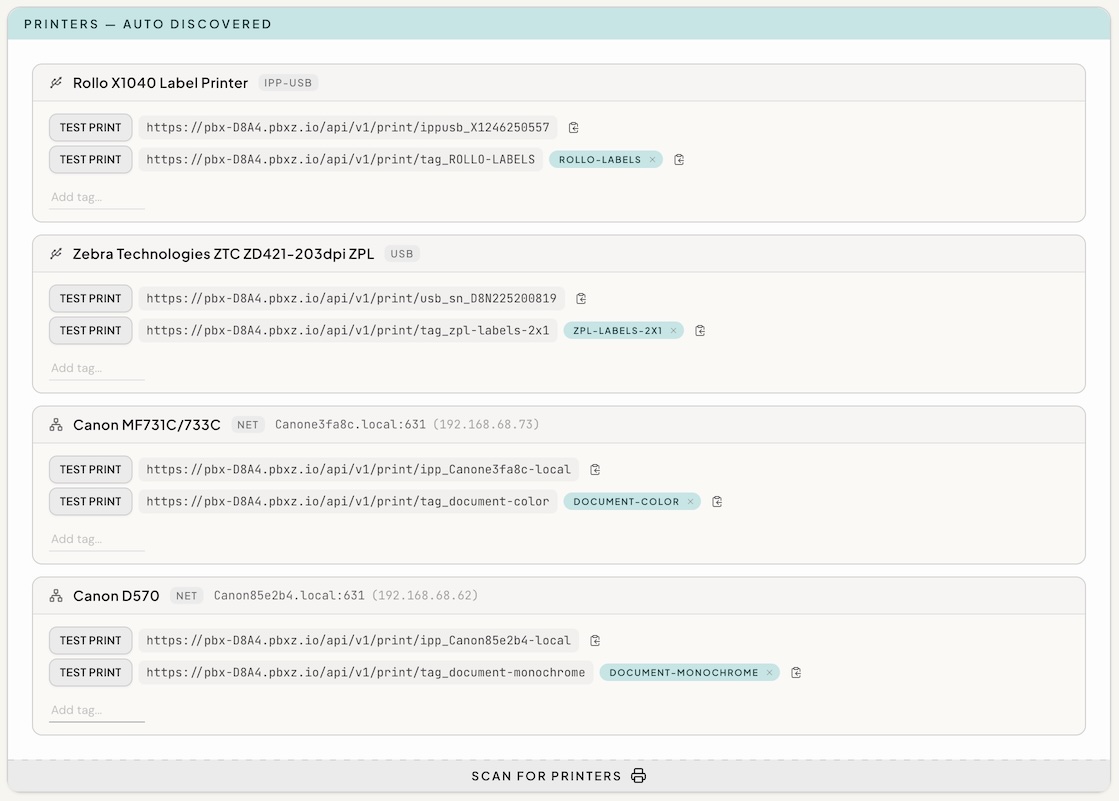
Device replacement without code changes
Your USB Zebra printer fails. You replace it with a newer networked model. Instead of updating every application that prints to it, just assign the same tag to the new device. Your apps keep sending to /print/tag_UPSLABELS and ProxyBox routes to the new hardware automatically.
If you've ever had to reconfigure a dozen workstations because a printer IP changed, you understand why this matters.
The complete printing platform
From application data to printed output — no desktop software, no print drivers, no manual steps.
Design & Generate
Template design, data binding, and document rendering. PDF, PNG, ZPL, HTML — any format from a single JSON template. Cloud-hosted or on-premises via ProxyBox.
- Visual template designer
- Dynamic data binding with expressions
- Barcodes, QR codes, repeating rows
- Multi-format: PDF, ZPL, PNG, HTML
PROXYBOX ZERODeliver & Print
Route documents to any local printer — thermal labels, laser, inkjet — from anywhere via secure HTTPS API. Job tracking, print options, real-time status.
- Job IDs with status tracking
- Copies, duplex, paper size, color mode
- USB, network, and IPP printers
- Secure remote access — no VPN required
Your application sends data. Bindery Press renders the document. ProxyBox delivers it to the printer. No drivers, no desktop software, no manual steps.
const binderyUrl  = 'https://api.binderypress.dev/render'
const binderyKey  = 'bpk_live_J4zT3xN8vKqP'
const proxyboxUrl = 'https://pbx-D8A4.pbxz.cloud/api/v1/print/tag_zpl_labels_3x1'
const proxyboxKey = 'pbx_5VBA5FV9JDBA'

// 1. BinderyPress renders a label from your data
const { zpl } = await post(binderyUrl, binderyKey, { template: 'shipping-3x1', data })

// 2. ProxyBox prints it on the warehouse Zebra
await post(proxyboxUrl, proxyboxKey, zpl)
What else can ProxyBox do?
Printing is the headline — but any local device behind ProxyBox becomes a secure HTTPS endpoint. Read, write, and integrate your hardware the same simple way.
Read scales & sensors
Pull live weight and measurement readings from USB scales, dimensioners, and serial sensors with a single GET — straight into your cloud workflow.
Wrap any device in TLS
Insecure HTTP-only and legacy network devices get an encrypted HTTPS endpoint automatically — no firmware changes, no exposed local ports.
Hardware for AI agents
ProxyBox is an MCP server. Claude, ChatGPT, and any MCP client can list printers, print labels, and check jobs through the same secure, authenticated API.
Act as an IFS Print Agent
Connect cloud-hosted IFS Cloud to printers at any site — ProxyBox is a full IFS Print Agent, with no standalone agent software and no per-workstation installs.
# Read live weight from a USB scale
GET  https://pbx-D8A4.pbxz.cloud/api/v1/device/usb_sn_MET72041809
Your AI agent just got a printer.
Every ProxyBox is an MCP server. Connect Claude, ChatGPT, or any MCP client with one URL, and your agent can list printers, print, and check job status on hardware in your building — with the same authenticated API your software uses.
Turn on MCP
Flip the switch in the Agent Access card on your device’s admin page. MCP is off by default.
Generate an MCP URL
One URL carries its own API key. Disable or delete that key in Settings and every agent using it is cut off on its next request.
Add it as a connector
Claude.ai, ChatGPT, grok.com, Claude Code, or any MCP client. Local agents use the LAN address; remote agents use your .cloud address.
list_printersget_printerprintget_jobtest_printdiscover_printersget_statusBuilt by developers, for developers
ProxyBox was born out of frustrations encountered while building integrations for cloud enterprise ERP software. Talking to local hardware from those cloud services proved to be a difficult problem to solve within the boundaries provided by modern browsers. So we built the product we wished existed — where the API, the dashboard, and every interface were designed from the developer's perspective first.
RESTful API
OpenAPI specification with predictable, resource-based URLs. Print options, job tracking, and printer status — all built in.
Print job tracking
Every print returns a job ID. Set copies, duplex, paper size. Submit async and poll for status, or block until complete.
HTTPS everywhere
Proxy insecure HTTP devices over TLS. Every local device becomes a secure endpoint.
USB serial devices
Read scales, scanners, and serial hardware over the same REST API.
Owner-controlled API key
Every request is secured by an API key that you generate and control from the dashboard.
Any language, any framework
If it can make an HTTP request, it works with ProxyBox. JavaScript, Python, C#, curl — anything.
# Print a shipping label
curl -X POST https://pbx-D8A4.pbxz.cloud/api/v1/print/tag_SHIPPING \
  -H "X-API-Key: pbx_5VBA5FV9JDBA" \
  -H "Content-Type: application/json" \
  -d '{"content": "<base64>", "contentType": "pdf_base64"}'
const PBX = 'https://pbx-D8A4.pbxz.cloud'
const KEY = 'pbx_5VBA5FV9JDBA'

await fetch(`${PBX}/api/v1/print/tag_SHIPPING`, {
  method: 'POST',
  headers: { 'X-API-Key': KEY, 'Content-Type': 'application/json' },
  body: JSON.stringify({ content: labelPdf, contentType: 'pdf_base64' })
})
import requests

PBX = 'https://pbx-D8A4.pbxz.cloud'
KEY = 'pbx_5VBA5FV9JDBA'

requests.post(f'{PBX}/api/v1/print/tag_SHIPPING',
  headers={'X-API-Key': KEY},
  json={'content': label_pdf, 'contentType': 'pdf_base64'})
All major browsers are shipping Local Network Access (LNA) restrictions that block web apps from talking to devices on your local network — printers, scales, scanners, anything on a private IP. If your cloud software currently prints to a local printer through the web browser, it will stop working without user intervention. This is already live in Chrome and rolling out across other browsers.
Our .cloud tunnel bypasses LNA entirely
When your browser talks to a ProxyBox .cloud URL, it's making a request to a public address — not a local one. LNA restrictions simply don't apply. No permission prompts, no user confusion, no support tickets.
Each web app origin that needs to reach a local device triggers its own LNA permission dialog — per browser, per workstation. Only organizations running enterprise-level group policies have the ability to disable this permission model.
All requests route through a public URL. The browser sees a normal HTTPS request to a public address — LNA never triggers.
Zero permission prompts
Your browser talks to a public URL, not a local address. LNA restrictions never apply — no dialogs, ever.
Zero user friction
Warehouse workers, shop floor operators, and office staff never see a confusing permission dialog.
Zero support headaches
No per-origin permissions to manage across workstations. No browser policy workarounds. It just works.
What is Browser LNA?
Local Network Access (LNA) is a new browser security model — already shipping in Chrome 142+ and being adopted by all major browsers — that blocks web apps from reaching devices on your local network unless the user explicitly allows it. Each web app origin that needs local network access triggers its own permission prompt. Only organizations running enterprise-level group policies have the ability to disable this permission model.
For local-network-only access, ProxyBox consolidates everything behind a single *.pbxz.io domain — so each web app only needs one LNA prompt to reach all your devices. We're also working with the W3C working group to eliminate LNA prompts for HTTPS-enabled devices entirely.
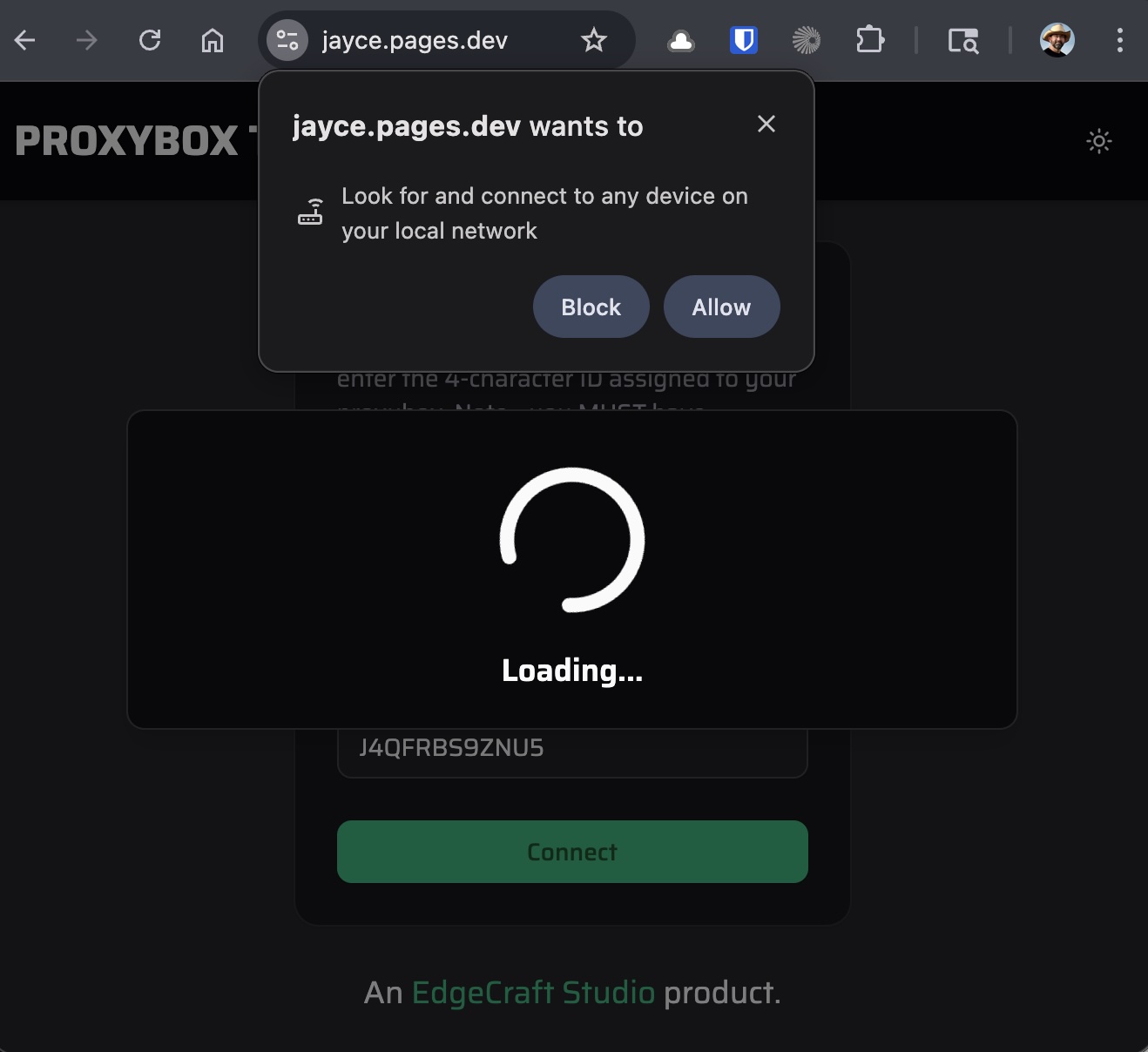
The browser LNA permission prompt
One device. Two ways to buy.
ProxyBox Zero is built on the Raspberry Pi 4. Pick how you pay — the device and the service are the same either way.
Includes cloud infrastructure, device management, security updates, and priority human support through multiple channels — for the life of the device.
Includes the first year of the same service. After year one it renews annually, and the device needs an active subscription to function.
Ready to modernize your device infrastructure?
Get a ProxyBox Zero for your team. Demo units available for qualified deployments.
Demo units available for platform builders and enterprise evaluations. Tell us about your deployment and we'll help you get started.